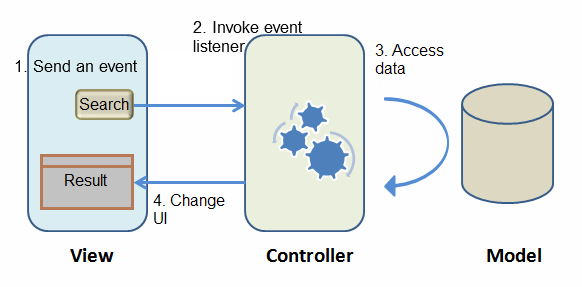
|
Processing...
Description & Source Code
demo.zul
<window title="Search" width="600px" border="normal"
	apply="demo.getting_started.mvc.SearchController">
	<hlayout valign="middle">
		Keyword:
		<textbox id="keywordBox" />
		<button id="searchButton" label="Search" iconSclass="z-icon-search" />
	</hlayout>
	<listbox id="carListbox" emptyMessage="No car found in the result" height="160px" style="margin-top:10px">
		<listhead>
			<listheader label="Model" />
			<listheader label="Make" />
			<listheader label="Price" width="20%"/>
		</listhead>
		<template name="model">
			<listitem>
				<listcell label="${each.model}"></listcell>
				<listcell label="${each.make}"></listcell>
				<listcell>$<label value="${each.price}" /></listcell>
			</listitem>
		</template>
	</listbox>
	<hlayout style="margin-top:20px" id="detailBox" visible="false">
		<image id="previewImage" style="padding:10px" />
		<vlayout>
			<hlayout>
				Model : <label id="modelLabel" style="font-weight:bold"/>
			</hlayout>
			<hlayout>
				Make : <label id="makeLabel" style="font-weight:bold"/>
			</hlayout>
			<hlayout>
				Price :
				<span>$<label id="priceLabel" style="font-weight:bold"/></span>
			</hlayout>
			<label id="descriptionLabel" />
		</vlayout>
	</hlayout>
</window>
SearchController.java
package demo.getting_started.mvc;


import java.util.List;
import java.util.Set;

import org.zkoss.zk.ui.Component;
import org.zkoss.zk.ui.select.SelectorComposer;
import org.zkoss.zk.ui.select.annotation.Listen;
import org.zkoss.zk.ui.select.annotation.Wire;
import org.zkoss.zul.Image;
import org.zkoss.zul.Label;
import org.zkoss.zul.ListModelList;
import org.zkoss.zul.Listbox;
import org.zkoss.zul.Textbox;
import org.zkoss.zul.ext.Selectable;

import demo.getting_started.tutorial.Car;
import demo.getting_started.tutorial.CarService;
import demo.getting_started.tutorial.CarServiceImpl;

public class SearchController extends SelectorComposer<Component> {

	private static final long serialVersionUID = 1L;

	@Wire
	private Textbox keywordBox;
	@Wire
	private Listbox carListbox;
	@Wire
	private Label modelLabel;
	@Wire
	private Label makeLabel;
	@Wire
	private Label priceLabel;
	@Wire
	private Label descriptionLabel;
	@Wire
	private Image previewImage;
	@Wire
	private Component detailBox;


	private CarService carService = new CarServiceImpl();

	@Listen("onClick = #searchButton")
	public void search(){
		String keyword = keywordBox.getValue();
		List<Car> result = carService.search(keyword);
		carListbox.setModel(new ListModelList<Car>(result));
	}

	@Listen("onSelect = #carListbox")
	public void showDetail(){
		detailBox.setVisible(true);

		Set<Car> selection = ((Selectable<Car>)carListbox.getModel()).getSelection();
		if (selection!=null && !selection.isEmpty()){
			Car selected = selection.iterator().next();
			previewImage.setSrc(selected.getPreview());
			modelLabel.setValue(selected.getModel());
			makeLabel.setValue(selected.getMake());
			priceLabel.setValue(selected.getPrice().toString());
			descriptionLabel.setValue(selected.getDescription());
		}
	}
}
Car.java
package demo.getting_started.tutorial;

public class Car {

	private Integer id;
	private String model;
	private String make;
	private String preview;
	private String description;
	private Integer price;

	public Car() {
	}

	public Car(Integer id, String model, String make, String description, String preview, Integer price) {
		this.id = id;
		this.model = model;
		this.make = make;
		this.preview = preview;
		this.description = description;
		this.price = price;
	}

	public Integer getId() {
		return id;
	}

	public void setId(Integer id) {
		this.id = id;
	}

	public String getMake() {
		return make;
	}

	public void setMake(String make) {
		this.make = make;
	}

	public String getPreview() {
		return preview;
	}

	public void setPreview(String preview) {
		this.preview = preview;
	}

	public String getDescription() {
		return description;
	}

	public void setDescription(String description) {
		this.description = description;
	}

	public Integer getPrice() {
		return price;
	}

	public void setPrice(Integer price) {
		this.price = price;
	}

	public String getModel() {
		return model;
	}

	public void setModel(String model) {
		this.model = model;
	}
}
CarService.java
package demo.getting_started.tutorial;

import java.util.List;

public interface CarService {

	/**
	 * Retrieve all cars in the catalog.
	 * @return all cars
	 */
	public List<Car> findAll();

	/**
	 * search cars according to keyword in name and company.
	 * @param keyword for search
	 * @return list of car that match the keyword
	 */
	public List<Car> search(String keyword);
}
|